Working with the IoT platform
User interface of the IoT platform — navigation, dashboard, sections and a summary of all available subsections.
User Interface
User Interface The IoT platform has a component architecture of sections, which ensures flexibility and ease of use. The availability of sections for the user depends on the assigned access level. For more information on roles and permissions, see the “User Administration” section of the documentation.
Example of the platform administrator’s workspace
The project administrator account provides the maximum set of modules and tools. The figure below shows the interface of the administrator’s workspace.
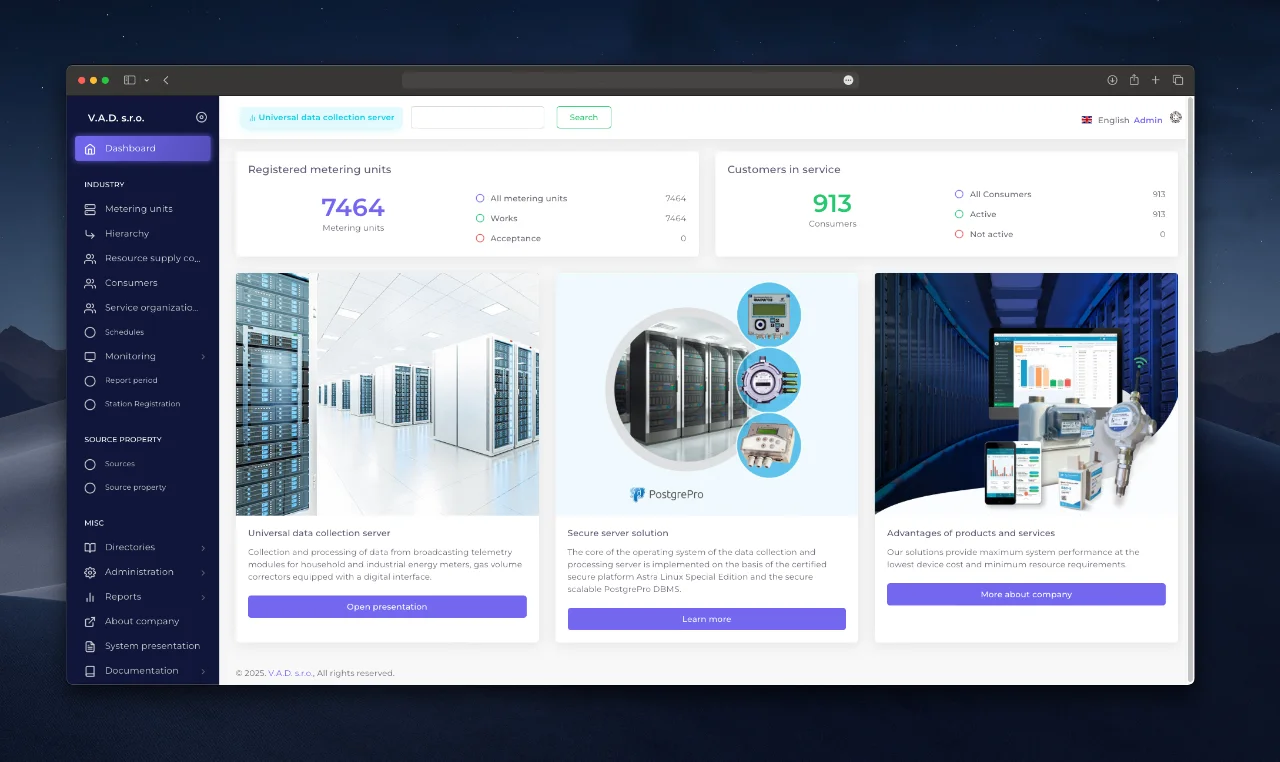
Interface navigation
The main navigation panel of the system is divided into three main sections:
- Industry
- Energy resource parameters
- Other
Dashboard
Start page after authorization. Contains the following summary data:
- Number of available metering units;
- Number of consumers.
Section “Industry”
The objective of this section is to organize the infrastructure of the resource supplier (see section “Creating the structure of the supplier’s networks”) and monitoring the operability of metering devices through the “Monitoring” module, including metering device connections, communication sessions, and zero flow analysis.
Subsections:
- Metering units
- Metering unit hierarchy
- Resource supply companies
- Consumers
- Service organizations
- Schedules
- Monitoring
- Reporting periods
- Metering unit registration
Section “Energy resource parameters”
This section is responsible for resource quality control (for example, transferring data on the physical and chemical composition of gas).
Subsections:
- Energy resource sources
- Energy resource parameters
Section “Other”
The section performs reference and reporting tasks, as well as managing users and the system log (see section “Creating and editing users”).
Subsections:
- References
- Administration (available only to the project administrator)
- Reports
- About the company
- System presentation
- Documentation
- Service software
Description of subsections
| Name | Description | Link |
|---|---|---|
| Dashboard | Summary statistics on registered metering units and consumers. | — |
| Metering units | Register of registered metering units. | View |
| Hierarchy | Tree structure “Supplier - Consumer metering unit”. | View |
| Resource supply companies | Data on resource providers. | View |
| Consumers | Information about registered consumers. | View |
| Service Organizations | Service organizations. | View |
| Schedules | Setting up communication sessions with metering units. | View |
| Monitoring | Instruments for monitoring the operation of metering units. | View |
| Reporting periods | Automation of report generation. | View |
| Sources/Energy Resource Parameters | Resource data management. | View |
| Directories | Database of equipment, system resources and metering devices (read only). | — |
| Administration | Manage users and system log. | View |
| Reports | Working with reporting. | View |
| About the company | Information about the system developer. | — |
| System presentation | PDF presentation of the system functionality. | — |
Next steps
Эта страница была полезной?
Спасибо за ваш отзыв!